
6th Grade

6th Grade Workshop
Teaching coding is no easy feat, and you’ve done an exceptional job at it this school year! This workshop is designed to help you continue building your confidence with the 9 Dots curriculum during the second half of the year. We’ll begin by reviewing key coding concepts in your grade level’s curriculum, followed by dedicated planning time to ensure you are well-prepared to lead your upcoming coding lessons. Finally, we’ll provide a sneak peek of what’s to come in the Module 4 project your students will work on by the end of the year.
Quick Navigation
Review Coding Concepts
In this module, students build on their coding skills by applying computational thinking to solve problems with JavaScript. The first module begins with a review of fundamental coding concepts before transitioning to a focus on computational thinking. Let’s explore three of the concepts they will practice below:
1) Loops
A loop is a programming structure or tool that efficiently repeats a sequence of instructions. When using the loop tool, you are looking to identify a sequence of code that repeats.
In lesson 1.04, students practice identifying patterns and using loops to repeat code. Watch this video to learn how to solve a challenge using loops:
Try solving this challenge from lesson 1.04!
2) If-Then Conditionals
In PixelBots' JavaScript, the "if-then" conditional is used to make decisions based on color. It works like this: if the PixelBot is on a pixel that matches a specific color you've defined, then the computer will carry out the instructions you've written inside the conditional statement. If the PixelBot is not on a pixel of that color, then the computer will skip over those instructions. This allows for actions to be executed based on the color the PixelBot is currently on.
In lesson 1.05, students write conditionals to code programs that execute based on specified conditions. Watch this video to learn how to solve a challenge using if-then conditionals:
Try this challenge from lesson 1.05!
💡 What challenges might your students face when writing code with conditionals?
3) Functions
In coding, a function is like a recipe in a cookbook: you define a sequence of code to perform a task and then use it repeatedly by calling its name. This process involves two main steps: defining the function (writing the 'recipe') and then calling it in your code (using the 'recipe'), a crucial skill covered in depth throughout the module.

In lesson 2.03 students are introduced to functions and practice calling functions to gain an understanding of the tool. Watch this video to learn how to solve a challenge by calling functions:
Try this challenge from lesson 2.03!
3) Functions & Parameters
A parameter is a special kind of variable1 used in a function that allows you to customize it for a specific need. In JavaScript on Pixelbots, we focus on utilizing length and color parameters to customize our functions.
In lesson 2.06 students learn how to define and call functions with parameters. Watch this video to learn how to solve a challenge using functions with parameters:
Try this challenge from lesson 2.06!
💡 What are the two types of parameters we use in functions?
Review Lessons & Create Your Action Plan
Prepare for your upcoming lessons by reviewing lesson materials and creating an Action Plan. Start by reviewing the lesson plan, slideshow, and challenges, and then decide which section(s) of the lesson you’ll lead or co-lead with your coordinator.
💡 Use the Graphic Organizer for step by step instructions to create your Action Plan
Preview Module 4: PixelBot Game Studio
With any remaining time you have, take a sneak peek at the project your students are building up to!
In Module G4, students conclude the coding year by participating in a fun and creative project, PixelBot Game Studio, that has them code their own customizable video game character. The project has the following requirements:
You must color in at least 75% of the pixels in the project grid.
Your code must use at least two variables that store the color value of different parts of your character.
You must be able to present your project by lesson 5.
Stretch Goals:
Include at least 2 functions in your code.
Include at least 3 loops in your code.
This module consists of 5 lessons, guiding students through designing and coding a character step by step:
Lesson 01:
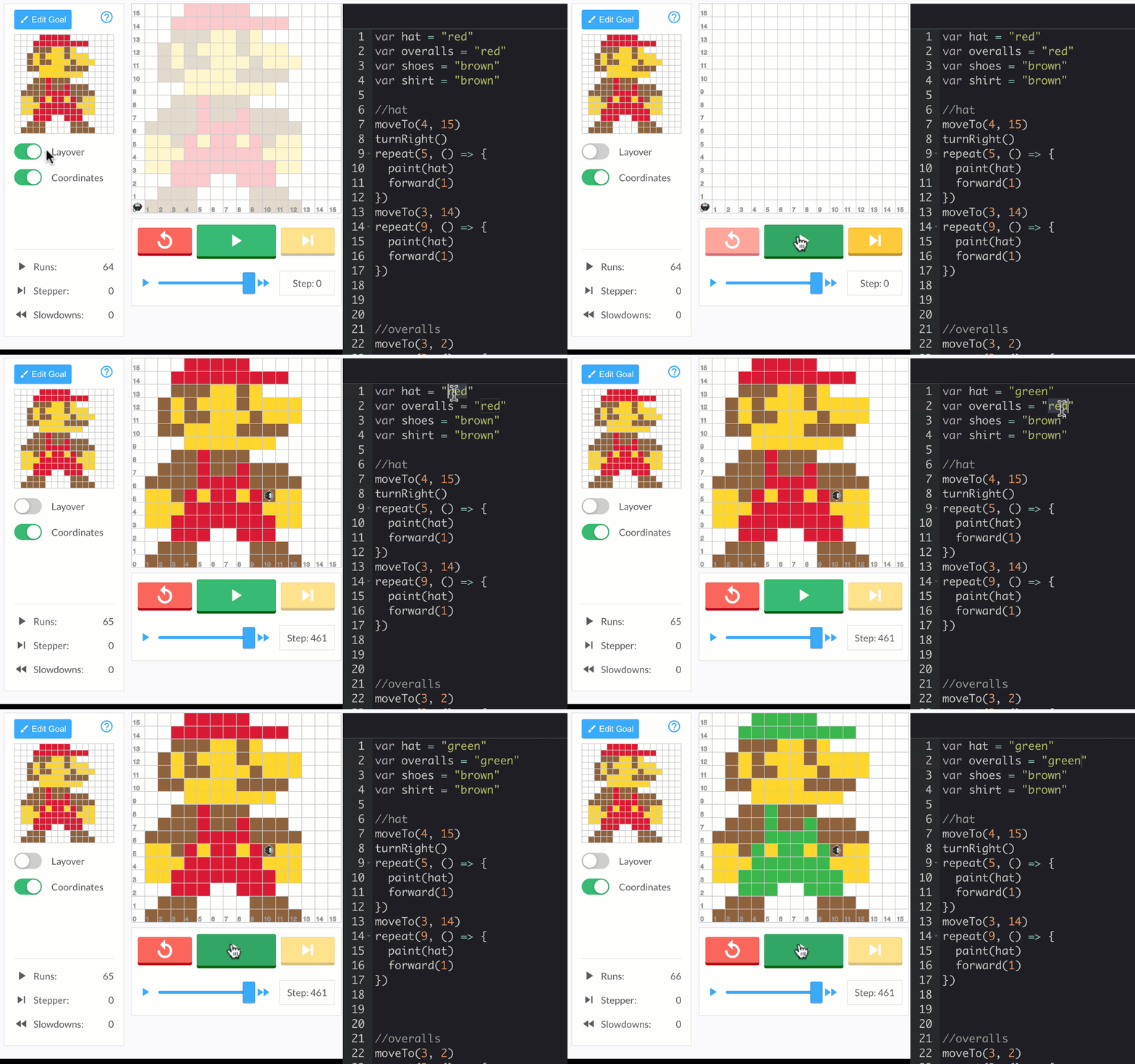
Review variables and x, y coordinates using moveTo(x, y).
Begin designing a character if students finish early.
Lesson 02:
Finalize character design.
Plan ahead by decomposing code using comments.
Decide which variables will be needed.
Start writing code to build the character.
Lesson 03:
Continue writing code to complete the character.
Take on the challenge of creating a custom function to enhance the character design.
Lesson 04:

Complete the character’s code by the end of the lesson.
Early finishers will fill out a preparation form to get ready to share their project in the next class. Please print & distribute one copy of this handout to each student.
Lesson 05:
Complete the presentation form and practice presenting with a peer.
Share projects with the whole class.
Conclude the lesson with a reflection activity.
You can take a deeper look at this module by reviewing the Scope and Sequence here, or via the 9 Dots platform.
Survey
Thank you for attending our Semester II PD! We take teacher feedback seriously, please take our survey here.
Additional Resources
For more practice, please log onto the 9 Dots platform to review lesson resources. If you need some support navigating our platform, please review the 9 Dots Teacher Guide.
If you would like some additional one-on-one support, please email your school’s Impact Manager or email us at [email protected]
Footnotes
[1] A variable is a container for storing information or data